
Description
Holybro SiK Telemetry Radio V3 SPECIFICATIONS
Wheelbase: Bottom Plate
Upgrade Parts/Accessories: Adapter
Tool Supplies: Cutting
Technical parameters: Value 2
Remote Control Peripherals/Devices: Receivers
Recommend Age: 12+y
RC Parts & Accs: Antennas
Origin: Mainland China
Model Number: HolyBro 433Mhz 915Mhz 100mW Transceiver Radio Telemetry Set V3
Material: Composite Material
Four-wheel Drive Attributes: Assemblage
For Vehicle Type: Airplanes
Brand Name: uuustore
HolyBro 433Mhz 915Mhz 100mW Transceiver Radio Telemetry Set V3 for PIXHawk 4 Flight Controller
Introducation:
It is a small. light and inexpensive open source radio platform that typically allows ranges of better than 300m “out of the box”
(the range can be extended to several kilometers with the use of a patch antenna on the ground).
The radio uses open source firmware which has been specially designed to work well with MAVLink packets
and to be integrated with the Mission Planner. Copter.Rover. and Plane.
Specification:
Brand Name: HolyBro
Version: 433Mhz / 915Mhz ( Optional)
Item Name: 433Mhz 915Mhz 100mW Transceiver Radio Telemetry Set V3
Application: Compatible for Pixhawk 4 Flight Controller
Size: 26 x 53 x 10.7mm (without antenna)
Processing
– 100 mW maximum output power (adjustable) -117 dBm receive sensitivity- Open-source SIK firmware- RP-SMA connector- 2-way full-duplex communication through adaptive TDM UART interface- Transparent serial link- MAVLink protocol framing- Frequency Hopping Spread Spectrum (FHSS) Configurable duty cycle- Error correction corrects up to 25% of bit errors Open-source SIK firmwareConfigurable through Mission Planner & APM PlannerFT230X is a USB to BASIC UART IC
Power- Supply Voltage: 5VDC (from USB or JST-GH)- Transmit Current: 100 mA at 20dBm- Receive current: 25 mA- Serial interface: 3.3 V UART
Status LEDs- The radios have 2 status LEDs. one red and one green. The meaning of the different LED states is:- Green LED blinking – searching for another radio- Green LED solid – link is established with another radio- Red LED flashing – transmitting data- Red LED solid – in firmware update mode
Connecting to Pixhawk4Use the 4 pin JST-GH connector that should have come with the radio to connect the radio to your Pixhawk4’s “Telem 1”
(“Telem 2” can also be used but the default recommendation is “Telem1”). Connecting to a PCConnecting the radio to your Windows PC is as simple as connecting the micro USB cable
(which should have been included with the radio) to your PC.
The necessary drivers should be installed automatically and the radio will appear as a new “USB Serial Port”
in the Windows Device Manager under Ports (COM & LPT).
The Mission Planner’s COM Port selection drop-down should also contain the same new COM port.
Package Included:
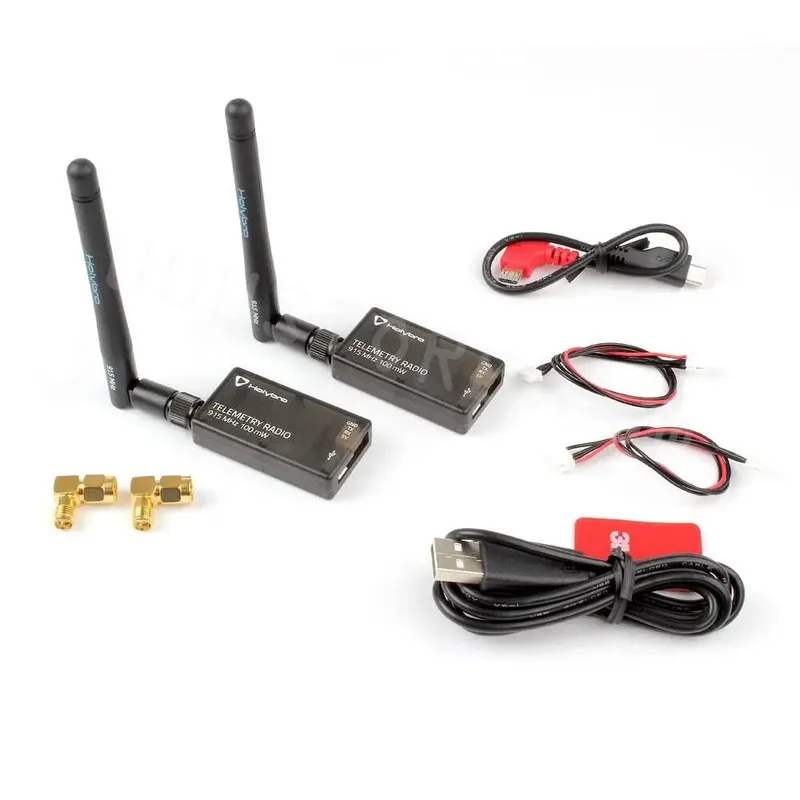
2x 433Mhz OR 915Mhz Radio Module with antenna
1x Micro-USB cable 1x Android OTG adapter cable 1x GH 6P-GH 4P cable 1x MLX 6P-GH 4P cable 2x SMA Adapter
‘RADIO 0’mW Helvisre 433 Miz HeMe TELEMETRY RADIO 433MHz ‘I0OmW 3 Helvsrs 433 MHz’


Reviews
There are no reviews yet.